mirror of
https://github.com/LifeArchiveProject/WeChatDataAnalysis.git
synced 2026-06-18 15:54:08 +08:00
 2977094657
253 lines
11 KiB
Markdown
253 lines
11 KiB
Markdown
<p align="center">
|
||
<img src="frontend/public/logo.png" alt="微信数据库解密工具" width="200" />
|
||
</p>
|
||
|
||
<div align="center">
|
||
<h1>WeChatDataAnalysis - 微信数据库解密与分析工具</h1>
|
||
<p>微信4.x数据解密并生成年度总结,高仿微信,支持实时更新,导出聊天记录,朋友圈等大量便捷功能</p>
|
||
<p><b>特别致谢</b>:<a href="https://github.com/H3CoF6">H3CoF6</a>(密钥与朋友圈等核心内容的技术支持)、<a href="https://github.com/ycccccccy/echotrace">echotrace</a>、<a href="https://github.com/hicccc77/WeFlow">WeFlow</a>(本项目大量功能参考其实现)</p>
|
||
<p>如需定制功能,请联系 QQ:2977094657。</p>
|
||
<img src="https://img.shields.io/github/v/tag/LifeArchiveProject/WeChatDataAnalysis" alt="Version" />
|
||
<img src="https://img.shields.io/github/stars/LifeArchiveProject/WeChatDataAnalysis" alt="Stars" />
|
||
<img src="https://gh-down-badges.linkof.link/LifeArchiveProject/WeChatDataAnalysis" alt="Downloads" />
|
||
<img src="https://img.shields.io/github/forks/LifeArchiveProject/WeChatDataAnalysis" alt="Forks" />
|
||
<a href="https://qm.qq.com/q/VQEQ7PcGkk"><img src="https://img.shields.io/badge/QQ Group-WeChatDataAnalysis-12B7F5?logo=tencentqq&logoColor=white" alt="QQ Group" /></a>
|
||
<img src="https://img.shields.io/badge/Python-3776AB?logo=Python&logoColor=white" alt="Python" />
|
||
<img src="https://img.shields.io/badge/Vue.js-4FC08D?logo=Vue.js&logoColor=white" alt="Vue.js" />
|
||
<img src="https://img.shields.io/badge/SQLite-003B57?logo=SQLite&logoColor=white" alt="SQLite" />
|
||
</div>
|
||
|
||
## 年度总结
|
||
|
||
<table>
|
||
<tr>
|
||
<td align="center" colspan="2"><img src="frontend/public/style1.png" alt="年度总结 Modern" width="800"/></td>
|
||
</tr>
|
||
<tr>
|
||
<td><img src="frontend/public/AnnualSummary1.png" alt="AnnualSummary 1" width="400"/></td>
|
||
<td><img src="frontend/public/AnnualSummary2.png" alt="AnnualSummary 2" width="400"/></td>
|
||
</tr>
|
||
<tr>
|
||
<td><img src="frontend/public/AnnualSummary3.png" alt="AnnualSummary 3" width="400"/></td>
|
||
<td><img src="frontend/public/AnnualSummary4.gif" alt="AnnualSummary 4" width="400"/></td>
|
||
</tr>
|
||
<tr>
|
||
<td><img src="frontend/public/AnnualSummary5.gif" alt="AnnualSummary 5" width="400"/></td>
|
||
<td><img src="frontend/public/AnnualSummary6.png" alt="AnnualSummary 6" width="400"/></td>
|
||
</tr>
|
||
<tr>
|
||
<td><img src="frontend/public/AnnualSummary7.png" alt="AnnualSummary 7" width="400"/></td>
|
||
<td><img src="frontend/public/AnnualSummary8.png" alt="AnnualSummary 8" width="400"/></td>
|
||
</tr>
|
||
</table>
|
||
|
||
## 界面预览
|
||
|
||
<table>
|
||
<tr>
|
||
<td align="center" colspan="2"><b>聊天记录页面</b>(支持多种消息类型展示,样式尽可能与微信保持一致)</td>
|
||
</tr>
|
||
<tr>
|
||
<td colspan="2" align="center"><img src="frontend/public/message.png" alt="聊天记录页面" width="800"/></td>
|
||
</tr>
|
||
<tr>
|
||
<td align="center" colspan="2"><b>修改消息</b>(本地修改,支持恢复)</td>
|
||
</tr>
|
||
<tr>
|
||
<td colspan="2" align="center"><img src="frontend/public/edit.gif" alt="修改消息" width="800"/></td>
|
||
</tr>
|
||
<tr>
|
||
<td align="center" colspan="2"><b>实时消息同步</b>(点击侧边栏闪电图标后,消息会自动刷新)</td>
|
||
</tr>
|
||
<tr>
|
||
<td colspan="2" align="center"><img src="frontend/public/RealTimeMessages.gif" alt="实时消息同步" width="800"/></td>
|
||
</tr>
|
||
<tr>
|
||
<td align="center" colspan="2"><b>设置面板</b>(桌面行为、启动偏好、更新、朋友圈缓存策略)</td>
|
||
</tr>
|
||
<tr>
|
||
<td colspan="2" align="center"><img src="frontend/public/setting.png" alt="设置面板" width="800"/></td>
|
||
</tr>
|
||
<tr>
|
||
<td align="center" colspan="2"><b>朋友圈</b>(支持查看用户之前朋友圈的背景图及时间;本地查看过的朋友圈即使后续不可见也可以查看)</td>
|
||
</tr>
|
||
<tr>
|
||
<td colspan="2" align="center"><img src="frontend/public/sns.png" alt="朋友圈" width="800"/></td>
|
||
</tr>
|
||
<tr>
|
||
<td align="center" colspan="2"><b>聊天记录搜索</b></td>
|
||
</tr>
|
||
<tr>
|
||
<td colspan="2" align="center"><img src="frontend/public/search.png" alt="聊天记录搜索" width="800"/></td>
|
||
</tr>
|
||
<tr>
|
||
<td align="center" colspan="2"><b>聊天记录导出</b></td>
|
||
</tr>
|
||
<tr>
|
||
<td colspan="2" align="center"><img src="frontend/public/export.png" alt="聊天记录导出" width="800"/></td>
|
||
</tr>
|
||
<tr>
|
||
<td align="center" colspan="2"><b>联系人导出</b></td>
|
||
</tr>
|
||
<tr>
|
||
<td colspan="2" align="center"><img src="frontend/public/Contact.png" alt="联系人导出" width="800"/></td>
|
||
</tr>
|
||
</table>
|
||
|
||
## 加入群聊
|
||
|
||
也欢迎加入下方 QQ 群一起讨论。
|
||
|
||
<p align="center">
|
||
<a href="https://qm.qq.com/q/VQEQ7PcGkk">
|
||
<img src="frontend/public/QQImage_1770190010691_1103312318341691201.jpg" alt="WeChatDataAnalysis 加群二维码" width="360" />
|
||
</a>
|
||
</p>
|
||
|
||
## 快速开始
|
||
|
||
### 1. 下载并安装 EXE(Windows,推荐)
|
||
|
||
1. 打开 Release 页面(最新版):https://github.com/LifeArchiveProject/WeChatDataAnalysis/releases/latest
|
||
2. 下载 `WeChatDataAnalysis.Setup.<version>.exe` 并运行安装
|
||
3. 安装完成后启动 `WeChatDataAnalysis`
|
||
|
||
> 如果 Windows 弹出“未知发布者/更多信息”等提示,请确认下载来源为本仓库 Release 后再选择“仍要运行”。
|
||
|
||
### 2. 从源码运行(开发者/高级用户)
|
||
|
||
#### 2.1 克隆项目
|
||
|
||
```bash
|
||
git clone https://github.com/LifeArchiveProject/WeChatDataAnalysis.git
|
||
cd WeChatDataAnalysis
|
||
```
|
||
|
||
#### 2.2 安装后端依赖
|
||
|
||
```bash
|
||
# 使用uv (推荐)
|
||
uv sync
|
||
```
|
||
|
||
#### 2.3 安装前端依赖
|
||
|
||
```bash
|
||
cd frontend
|
||
npm install
|
||
```
|
||
|
||
#### 2.4 启动服务
|
||
|
||
#### 启动后端API服务
|
||
```bash
|
||
# 在项目根目录
|
||
uv run main.py
|
||
```
|
||
|
||
#### 启动前端开发服务器
|
||
```bash
|
||
# 在frontend目录
|
||
cd frontend
|
||
npm run dev
|
||
```
|
||
|
||
#### 2.5 访问应用
|
||
|
||
- 前端界面: http://localhost:3000
|
||
- API服务(默认): http://localhost:10392 (可通过环境变量 WECHAT_TOOL_PORT 修改)
|
||
- API文档(默认): http://localhost:10392/docs
|
||
- 也可在应用内“设置 -> 后端端口”修改(支持“恢复默认”一键回到 10392):网页端会尝试重启本机后端到新端口并刷新(并写入 `output/runtime_settings.json`,开发模式下也会写入项目根目录 `.env` 供 `uv run` 下次启动使用);桌面端会重启内置后端并刷新
|
||
|
||
## MCP 服务
|
||
|
||
后端提供 MCP JSON-RPC over HTTP 服务,默认只监听 `127.0.0.1`。手机接入局域网时,在应用内打开 **设置 -> MCP 接入 -> 允许手机局域网接入 MCP**,后端会切换为监听 `0.0.0.0` 并重启;设置页展示和复制的接入地址会使用电脑实际局域网 IP,例如 `http://192.168.x.x:10392/mcp`,而不是不可被其他设备访问的 `127.0.0.1`。
|
||
|
||
MCP 入口需要 token 鉴权。设置页提供 **MCP Token**、**AI 接入提示词** 和 **Skill Markdown** 三个独立复制区;token 可一键复制或重置,重置后旧 token 立即失效。手机端或外部 AI 客户端访问 `/mcp`、`/mcp/skill/bundle`、`/mcp/skill` 时,都应带上 `Authorization: Bearer <MCP_TOKEN>`。兼容客户端也可以使用 `X-MCP-Token` 请求头或 `?token=` 查询参数,但推荐使用 Bearer token。
|
||
|
||
通用客户端可以通过 `GET /mcp/skill/bundle` 读取同一份 bundle,通过 `GET /mcp/skill` 读取 markdown 版本,这两个 skill 入口同样需要 MCP token。
|
||
|
||
工具调用成功时,客户端优先读取 `result.structuredContent`,`content[0].text` 只是给通用 MCP 客户端展示的 JSON 文本副本。业务未就绪时仍可能返回 JSON-RPC success,但 `result.isError=true`;协议错误或参数错误则返回 JSON-RPC `error`。
|
||
|
||
MCP 仅暴露读取数据与获取媒体资源 URL/参数的能力;系统设置、索引与缓存构建、数据准备、导出、实时同步、本地修订、数据删除等操作类能力不通过 MCP 暴露,请在桌面/网页应用内使用。
|
||
|
||
工具按包分层:
|
||
|
||
- `wechat.core`: 状态、工具目录、账号列表、账号信息
|
||
- `wechat.mobile`: 面向手机和外部代理的聚合入口,默认返回小结果和下一步建议
|
||
- `wechat.contacts`: 联系人列表、模糊解析
|
||
- `wechat.chat`: 会话、消息、搜索、发送者筛选、上下文、锚点、合并转发/AppMsg 解析、统计
|
||
- `wechat.moments`: 朋友圈时间线、用户、图片/视频/文章封面 URL
|
||
- `wechat.media`: 聊天/朋友圈图片、视频、表情、头像、语音文件 URL、远程图片代理与资源辅助;只返回 URL 或资源参数,不提供下载缓存或打开本机目录操作
|
||
- `wechat.biz`: 公众号/服务号与微信支付记录
|
||
- `wechat.analytics`: 年度总结与聚合分析读取;年度总结只读取应用内已生成的缓存,未生成时请先在应用内打开年度总结
|
||
|
||
会话列表、联系人和头像相关接口均采用 best-effort 读取策略。即使 `contact.db` 中某些头像字段损坏或无法按 UTF-8 解码,也会继续返回昵称、会话摘要和其他可用内容,头像则自动降级为空或占位,不会阻塞整页数据加载。
|
||
|
||
媒体和视频不会直接塞进 MCP JSON 响应;相关工具返回可访问 URL 或资源参数。
|
||
|
||
配套 skill 可通过 HTTP 加载,访问时需要带 MCP token:
|
||
|
||
- JSON bundle: `http://<电脑局域网IP>:10392/mcp/skill/bundle`
|
||
- Markdown bundle: `http://<电脑局域网IP>:10392/mcp/skill`
|
||
|
||
手机端或外部 AI 客户端应先拉取 skill bundle,将 `bundleText` 注入模型上下文,再按 `initialize`、`tools/list`、`tools/call` 使用 MCP。设置页中的“AI 接入提示词”会包含 endpoint 和 Bearer token,可直接复制给客户端作为接入指令。
|
||
|
||
## 打包为 EXE(Windows 桌面端)
|
||
|
||
本项目提供基于 Electron 的桌面端安装包(NSIS `Setup.exe`)。
|
||
|
||
```bash
|
||
# 1) 安装桌面端依赖
|
||
cd desktop
|
||
npm install
|
||
|
||
# 2) 打包(会自动:nuxt generate -> 拷贝静态资源 -> PyInstaller 打包后端 -> electron-builder 生成安装包)
|
||
npm run dist
|
||
```
|
||
|
||
输出位置:`desktop/dist/WeChatDataAnalysis Setup <version>.exe`
|
||
|
||
## 使用指南
|
||
|
||
### 获取解密密钥
|
||
|
||
在使用本工具之前,您需要先获取微信数据库的解密密钥。推荐使用以下工具:
|
||
|
||
**wx_key** (推荐)
|
||
- 项目地址: https://github.com/ycccccccy/wx_key
|
||
- 支持获取微信 4.x 数据库密钥
|
||
|
||
## 安全说明
|
||
|
||
**重要提醒**:
|
||
|
||
1. **仅限个人使用**: 此工具仅用于解密您自己的微信数据
|
||
2. **密钥安全**: 请妥善保管您的解密密钥,不要泄露给他人
|
||
3. **数据隐私**: 解密后的数据包含个人隐私信息,请谨慎处理
|
||
4. **合法使用**: 请遵守相关法律法规,不得用于非法目的
|
||
|
||
## 致谢
|
||
|
||
1. **[echotrace](https://github.com/ycccccccy/echotrace)**
|
||
2. **[WeFlow](https://github.com/hicccc77/WeFlow)**
|
||
3. **[wx_key](https://github.com/ycccccccy/wx_key)**
|
||
4. **[wechat-dump-rs](https://github.com/0xlane/wechat-dump-rs)**
|
||
5. **[oh-my-wechat](https://github.com/chclt/oh-my-wechat)**
|
||
6. **[vue3-wechat-tool](https://github.com/Ele-Cat/vue3-wechat-tool)**
|
||
7. **[wx-dat](https://github.com/waaaaashi/wx-dat)**
|
||
8. **[Ritsu](https://xhslink.com/m/7YJUsd1sgyF)**
|
||
|
||
## Star History
|
||
|
||
[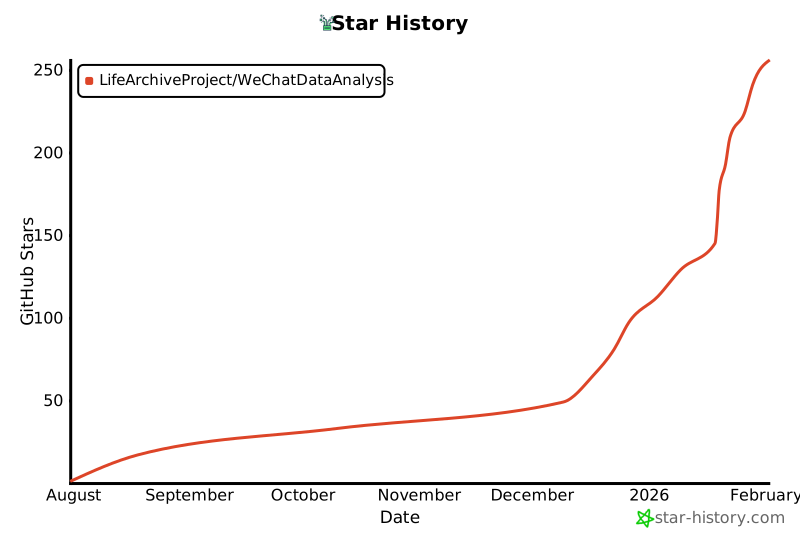](https://www.star-history.com/#LifeArchiveProject/WeChatDataAnalysis&Date)
|
||
|
||
## 贡献
|
||
|
||
欢迎提交Issue和Pull Request来改进这个项目。
|
||
|
||
---
|
||
|
||
**免责声明**: 本工具仅供学习研究使用,使用者需自行承担使用风险。开发者不对因使用本工具造成的任何损失负责。
|
||
|