# Using Pi
This page collects day-to-day usage details that do not fit on the quickstart page.
## Interactive Mode
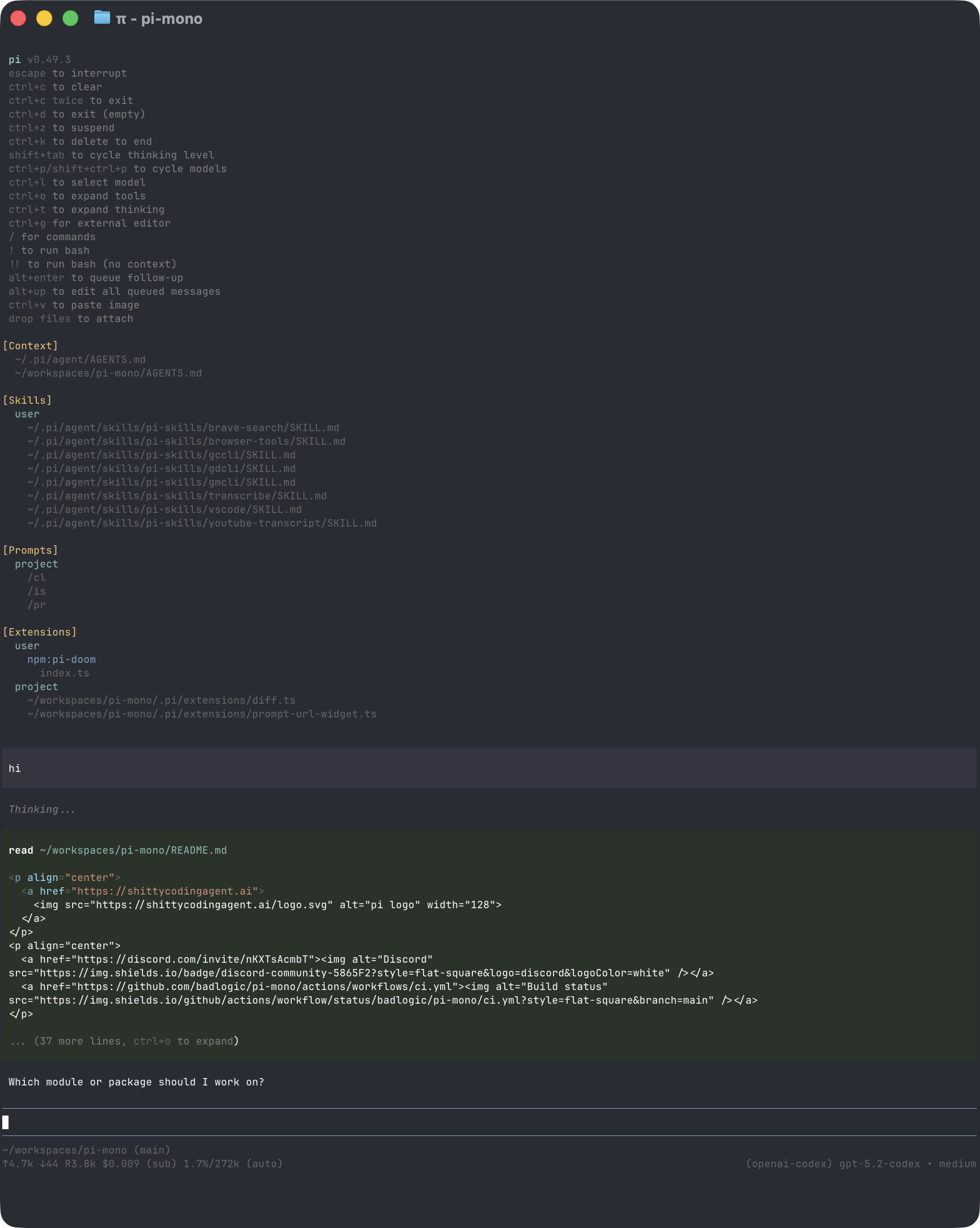
The interface has four main areas:
- **Startup header** - shortcuts, loaded context files, prompt templates, skills, and extensions
- **Messages** - user messages, assistant responses, tool calls, tool results, notifications, errors, and extension UI
- **Editor** - where you type; border color indicates the current thinking level
- **Footer** - working directory, session name, token/cache usage, cost, context usage, and current model
The editor can be replaced temporarily by built-in UI such as `/settings` or by custom extension UI.
### Editor Features
| Feature | How |
|---------|-----|
| File reference | Type `@` to fuzzy-search project files |
| Path completion | Press Tab to complete paths |
| Multi-line input | Shift+Enter, or Ctrl+Enter on Windows Terminal |
| Images | Paste with Ctrl+V, Alt+V on Windows, or drag into the terminal |
| Shell command | `!command` runs and sends output to the model |
| Hidden shell command | `!!command` runs without sending output to the model |
| External editor | Ctrl+G opens `$VISUAL` or `$EDITOR` |
See [Keybindings](keybindings.md) for all shortcuts and customization.
## Slash Commands
Type `/` in the editor to open command completion. Extensions can register custom commands, skills are available as `/skill:name`, and prompt templates expand via `/templatename`.
| Command | Description |
|---------|-------------|
| `/login`, `/logout` | OAuth authentication |
| `/pi.dev` | Create or sign in to a pi.dev profile |
| `/model` | Switch models |
| `/scoped-models` | Enable/disable models for Ctrl+P cycling |
| `/settings` | Thinking level, theme, message delivery, transport, activity sync |
| `/resume` | Pick from previous sessions |
| `/new` | Start a new session |
| `/name ` | Set session display name |
| `/session` | Show session file, ID, messages, tokens, and cost |
| `/tree` | Jump to any point in the session and continue from there |
| `/fork` | Create a new session from a previous user message |
| `/clone` | Duplicate the current active branch into a new session |
| `/compact [prompt]` | Manually compact context, optionally with custom instructions |
| `/copy` | Copy last assistant message to clipboard |
| `/export [file]` | Export session to HTML |
| `/share [pi.dev\|github]` | Upload with shareable HTML link backed by pi.dev when authenticated, otherwise GitHub gist |
| `/reload` | Reload keybindings, extensions, skills, prompts, and context files |
| `/hotkeys` | Show all keyboard shortcuts |
| `/changelog` | Display version history |
| `/quit` | Quit pi |
## Message Queue
You can submit messages while the agent is still working:
- **Enter** queues a steering message, delivered after the current assistant turn finishes executing its tool calls.
- **Alt+Enter** queues a follow-up message, delivered after the agent finishes all work.
- **Escape** aborts and restores queued messages to the editor.
- **Alt+Up** retrieves queued messages back to the editor.
On Windows Terminal, Alt+Enter is fullscreen by default. Remap it as described in [Terminal setup](terminal-setup.md) if you want pi to receive the shortcut.
Configure delivery in [Settings](settings.md) with `steeringMode` and `followUpMode`.
## Sessions
Sessions are saved automatically to `~/.pi/agent/sessions/`, organized by working directory.
```bash
pi -c # Continue most recent session
pi -r # Browse and select a session
pi --no-session # Ephemeral mode; do not save
pi --name "my task" # Set session display name at startup
pi --session # Use a specific session file or session ID
pi --fork # Fork a session into a new session file
```
Useful session commands:
- `/session` shows the current session file and ID.
- `/tree` navigates the in-file session tree and can summarize abandoned branches.
- `/fork` creates a new session from an earlier user message.
- `/clone` duplicates the current active branch into a new session file.
- `/compact` summarizes older messages to free context.
See [Sessions](sessions.md) and [Compaction](compaction.md) for details.
## Context Files
Pi loads `AGENTS.md` or `CLAUDE.md` at startup from:
- `~/.pi/agent/AGENTS.md` for global instructions
- parent directories, walking up from the current working directory when the project is trusted
- the current directory when the project is trusted
Use context files for project conventions, commands, safety rules, and preferences. Disable loading with `--no-context-files` or `-nc`.
### System Prompt Files
Replace the default system prompt with:
- `.pi/SYSTEM.md` for a project
- `~/.pi/agent/SYSTEM.md` globally
Append to the default prompt without replacing it with `APPEND_SYSTEM.md` in either location.
### Project Trust
On interactive startup, pi asks before trusting a project folder that contains project-local inputs and has no saved decision in `~/.pi/agent/trust.json`. Trusting a project allows pi to read project instructions (`AGENTS.md`/`CLAUDE.md`), load `.pi/settings.json` and `.pi` resources, install missing project packages, and execute project extensions.
Non-interactive modes (`-p`, `--mode json`, and `--mode rpc`) do not show a trust prompt. Without a saved trust decision, they ignore project-local inputs unless `--approve`/`-a` is passed. Use `--no-approve`/`-na` to ignore project-local inputs for one run even when the project is trusted.
`pi config` assumes project trust for that command so you can view and change project resource settings before starting a session. It does not save a trust decision; starting a session in that folder still prompts. Pass `--no-approve` to hide project-local inputs in `pi config`.
Use `/trust` in interactive mode to save a project trust decision for future sessions. It writes `~/.pi/agent/trust.json` only; the current session is not reloaded, so restart pi for changes to take effect.
## Exporting and Sharing Sessions
Use `/export [file]` to write a session to HTML.
Use `/share` to share the current session HTML. Pi uses pi.dev for an unlisted share when an authenticated pi.dev profile is already available; otherwise it creates a GitHub gist with the `gh` CLI and returns a share-viewer URL.
Use `/share pi.dev` to create or sign in to a pi.dev profile and upload to pi.dev. Use `/share github` to force the GitHub gist backend. `PI_SHARE_VIEWER_URL` controls the viewer base URL for GitHub gist shares.
### Activity Sync
Creating or signing in to a pi.dev profile during setup or with `/pi.dev` enables background activity sync. `/share pi.dev` signs in only to store shared sessions and does not change activity sync. Disable sync from `/settings` or by setting `piDev.activitySync.enabled` to `false`.
Activity sync uploads session activity analytics metadata to pi.dev, including session and entry metadata, model IDs, token/cost usage, and content block counts. It omits raw message content, tool arguments, thinking text, error text, labels, names, and custom data.
When enabled, Pi stores the pi.dev OAuth credential in `auth.json`, stores non-secret sync state in `activity-sync.json`, and writes settings under `piDev.activitySync` in `settings.json`. Background sync runs at most once every `piDev.activitySync.intervalHours` hours and is disabled by `PI_OFFLINE=1`.
If you use pi for open source work and want to publish sessions for model, prompt, tool, and evaluation research, see [`badlogic/pi-share-hf`](https://github.com/badlogic/pi-share-hf). It publishes sessions to Hugging Face datasets.
## CLI Reference
```bash
pi [options] [@files...] [messages...]
```
### Package Commands
```bash
pi install [-l] # Install package, -l for project-local
pi remove [-l] # Remove package
pi uninstall [-l] # Alias for remove
pi update [source|self|pi] # Update pi and packages; reconcile pinned git refs
pi update --extensions # Update packages only; reconcile pinned git refs
pi update --self # Update pi only
pi update --extension # Update one package
pi list # List installed packages
pi config # Enable/disable package resources
```
These commands manage pi packages, not the pi CLI installation. To uninstall pi itself, see [Quickstart](quickstart.md#uninstall). Project package commands accept `--approve`/`--no-approve` to trust or ignore project-local package settings for one command.
See [Pi Packages](packages.md) for package sources and security notes.
### Modes
| Flag | Description |
|------|-------------|
| default | Interactive mode |
| `-p`, `--print` | Print response and exit |
| `--mode json` | Output all events as JSON lines; see [JSON mode](json.md) |
| `--mode rpc` | RPC mode over stdin/stdout; see [RPC mode](rpc.md) |
| `--export [out]` | Export a session to HTML |
In print mode, pi also reads piped stdin and merges it into the initial prompt:
```bash
cat README.md | pi -p "Summarize this text"
```
### Model Options
| Option | Description |
|--------|-------------|
| `--provider ` | Provider, such as `anthropic`, `openai`, or `google` |
| `--model ` | Model pattern or ID; supports `provider/id` and optional `:` |
| `--api-key ` | API key, overriding environment variables |
| `--thinking ` | `off`, `minimal`, `low`, `medium`, `high`, `xhigh` |
| `--models ` | Comma-separated patterns for Ctrl+P cycling |
| `--list-models [search]` | List available models |
### Session Options
| Option | Description |
|--------|-------------|
| `-c`, `--continue` | Continue the most recent session |
| `-r`, `--resume` | Browse and select a session |
| `--session ` | Use a specific session file or partial UUID |
| `--fork ` | Fork a session file or partial UUID into a new session |
| `--session-dir ` | Custom session storage directory |
| `--no-session` | Ephemeral mode; do not save |
| `--name `, `-n ` | Set session display name at startup |
### Tool Options
| Option | Description |
|--------|-------------|
| `--tools `, `-t ` | Allowlist specific built-in, extension, and custom tools |
| `--exclude-tools `, `-xt ` | Disable specific built-in, extension, and custom tools |
| `--no-builtin-tools`, `-nbt` | Disable built-in tools but keep extension/custom tools enabled |
| `--no-tools`, `-nt` | Disable all tools |
Built-in tools: `read`, `bash`, `edit`, `write`, `grep`, `find`, `ls`.
### Resource Options
| Option | Description |
|--------|-------------|
| `-e`, `--extension ` | Load an extension from path, npm, or git; repeatable |
| `--no-extensions` | Disable extension discovery |
| `--skill ` | Load a skill; repeatable |
| `--no-skills` | Disable skill discovery |
| `--prompt-template ` | Load a prompt template; repeatable |
| `--no-prompt-templates` | Disable prompt template discovery |
| `--theme ` | Load a theme; repeatable |
| `--no-themes` | Disable theme discovery |
| `--no-context-files`, `-nc` | Disable `AGENTS.md` and `CLAUDE.md` discovery |
Combine `--no-*` with explicit flags to load exactly what you need, ignoring settings. Example:
```bash
pi --no-extensions -e ./my-extension.ts
```
### Other Options
| Option | Description |
|--------|-------------|
| `--system-prompt ` | Replace default prompt; context files and skills are still appended |
| `--append-system-prompt ` | Append to system prompt |
| `--verbose` | Force verbose startup |
| `-a`, `--approve` | Trust project-local files for this run |
| `-na`, `--no-approve` | Ignore project-local files for this run |
| `-h`, `--help` | Show help |
| `-v`, `--version` | Show version |
### File Arguments
Prefix files with `@` to include them in the message:
```bash
pi @prompt.md "Answer this"
pi -p @screenshot.png "What's in this image?"
pi @code.ts @test.ts "Review these files"
```
### Examples
```bash
# Interactive with initial prompt
pi "List all .ts files in src/"
# Non-interactive
pi -p "Summarize this codebase"
# Non-interactive with piped stdin
cat README.md | pi -p "Summarize this text"
# Named one-shot session
pi --name "release audit" -p "Audit this repository"
# Different model
pi --provider openai --model gpt-4o "Help me refactor"
# Model with provider prefix
pi --model openai/gpt-4o "Help me refactor"
# Model with thinking level shorthand
pi --model sonnet:high "Solve this complex problem"
# Limit model cycling
pi --models "claude-*,gpt-4o"
# Read-only mode
pi --tools read,grep,find,ls -p "Review the code"
# Disable one extension or built-in tool while keeping the rest available
pi --exclude-tools ask_question
```
### Environment Variables
| Variable | Description |
|----------|-------------|
| `PI_CODING_AGENT_DIR` | Override config directory; default is `~/.pi/agent` |
| `PI_CODING_AGENT_SESSION_DIR` | Override session storage directory; overridden by `--session-dir` |
| `PI_PACKAGE_DIR` | Override package directory, useful for Nix/Guix store paths |
| `PI_OFFLINE` | Disable startup network operations, including update checks, package update checks, and install/update telemetry |
| `PI_SKIP_VERSION_CHECK` | Skip the Pi version update check at startup. This prevents the `pi.dev` latest-version request |
| `PI_TELEMETRY` | Override install/update telemetry and provider attribution headers: `1`/`true`/`yes` or `0`/`false`/`no`. This does not disable update checks |
| `PI_DEV_URL` | Base URL for pi.dev API calls; default is `https://pi.dev` |
| `PI_SHARE_VIEWER_URL` | Base URL for GitHub gist `/share github` viewer URLs; default is `https://pi.dev/session/` |
| `PI_CACHE_RETENTION` | Set to `long` for extended prompt cache where supported |
| `VISUAL`, `EDITOR` | External editor for Ctrl+G |
## Design Principles
Pi keeps the core small and pushes workflow-specific behavior into extensions, skills, prompt templates, and packages.
It intentionally does not include built-in MCP, sub-agents, permission popups, plan mode, to-dos, or background bash. You can build or install those workflows as extensions or packages, or use external tools such as containers and tmux.
For the full rationale, read the [blog post](https://mariozechner.at/posts/2025-11-30-pi-coding-agent/).